Acer eNet Management:
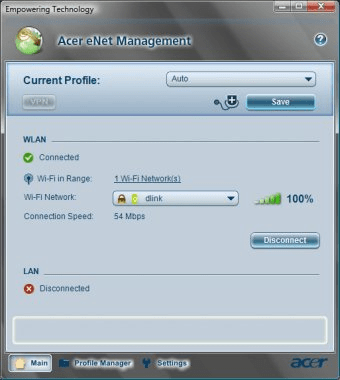
Acer eNet Management utility provides THREE Icons at the bottom of the Acer eNet Management Window screen namely 1) Main 2) Profile Manager & 3) Settings to access the different functions of Acer eNet Management.
Details provided under Main: The Acer eNet Management main page shows the current connection status, as well as a list of the available profiles available in the location and switches automatically to the appropriate profile. The other Options are for VPN settings, Network Advisor and Diagnostic Tools. The Network Adviser provides Computer details, Wireless Adapter, Wireless AP, Wired Adapter, Firewall and Diagnostic Tools for IP configuration, Trace Routing Table, Ping Remote Host. The WLAN Connection Status, Wi-Fi in Range, Wi-Fi Network (s) available, Connection Speed and LAN status are on this page.
If connected to a network the ‘Save button’ saves the settings to a profile.
Details provided under Profile Manager:
There are four tabs namely Edit (Auto), New (Profile), Import and Export. The Auto configuration is done form the Settings Icon. The New Profile Wizard has various profile management buttons that allow creation of a new profile, edit a profile, delete a profile, apply a profile, or import or export a profile The Import and Export are for existing Profiles. Different profiles for connecting to a network from a variety of locations, via wired or wireless connections can be set up. There are a number of screens to follow. more








Comments (6)